-
What You'll Find Here
-
1. What does Peloton actually offer for businesses?
-
2. Wait—so there's no Peloton mirror? Then what's the 'Peloton Guide'?
-
3. What's the weight limit on a Peloton treadmill? And does it fold?
-
4. How do you connect Bluetooth headphones to a Peloton device?
-
5. Should I buy Peloton for my office, or is it overkill?
-
6. Are there any hidden costs I should know about?
-
7. How do I justify Peloton to my CFO?
What You'll Find Here
I manage office procurement for a mid-size company—around 300 employees across two locations. When the VP of HR asked me to look into Peloton for our new wellness room, I had a dozen questions. Some I found answers to quickly; others I learned the hard way (like assuming a cheaper vendor would save us money—it didn't). Here's the FAQ I wish I'd had before I started. If you're in a similar seat, these are the real questions you'll need answered.
1. What does Peloton actually offer for businesses?
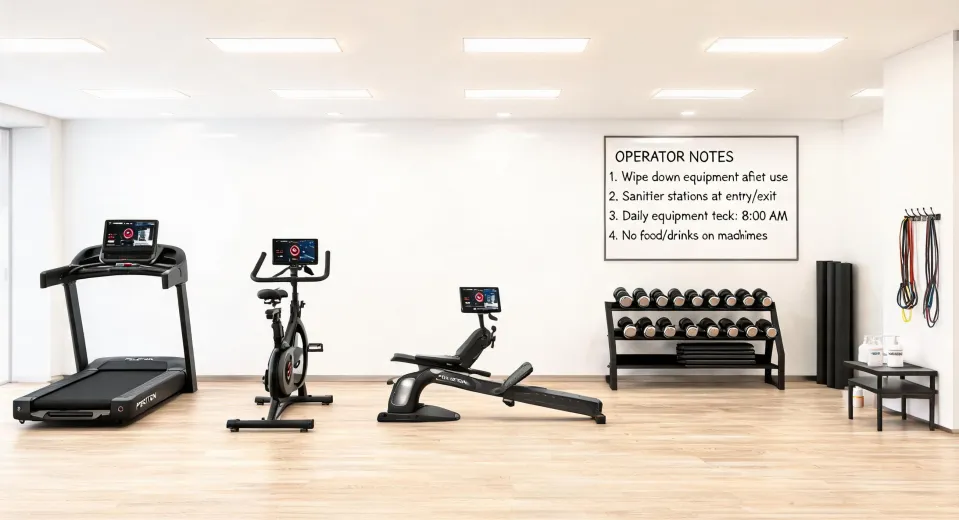
Peloton's commercial lineup includes the Bike, Bike+, Tread, Tread+, and Rower—all with the same premium screens and class library you'd see in a home setup. For offices, they also offer the Peloton Guide (a camera that tracks your form) and the Peloton App for digital-only access. But here's the catch: they don't make a mirror. If your team is asking for an 'exercise mirror,' that's typically a different brand (Mirror by Lululemon). Peloton's focus is the screen-and-hardware ecosystem. I learned this after spending two hours researching 'Peloton mirror'—don't make my mistake.
2. Wait—so there's no Peloton mirror? Then what's the 'Peloton Guide'?
Right, no mirror. The Peloton Guide is a small camera that attaches to your TV or monitor. It uses AI to show you your form during strength classes. It's not a mirror—it's a camera that displays your movement on-screen. For a corporate gym, it's a nice add-on but not essential. Bottom line: if someone specifically wants a mirror, you're looking at Mirror from Lululemon. But I'd argue Peloton's bike and treadmill are the more proven ROI for employee engagement—just my two cents after surveying our staff.
3. What's the weight limit on a Peloton treadmill? And does it fold?
Per Peloton's official specs (accessed January 2024), the Tread has a weight limit of 300 lbs (136 kg). The Tread+ is higher at 397 lbs (180 kg). Neither folds. That's a common misconception. The Tread is compact for a treadmill—it's about 5.5 feet long by 3 feet wide—but it does not fold up. If you need a folding treadmill for a tight space, Peloton isn't that. I almost ordered a Tread for a small conference room until I measured the space. Always measure twice. We ended up putting it in the main gym and using compact treadmills from another vendor for the small rooms. Saved a headache—and a $400 delivery change fee.
4. How do you connect Bluetooth headphones to a Peloton device?
Straightforward: on the Peloton touchscreen, go to Settings → Bluetooth → Headphones. Put your headphones in pairing mode, and they should appear in the list. Tap to connect. That's it. Works with any standard Bluetooth headphones (AirPods, Sony, JBL, etc.). But if you're managing a fleet of devices for your office, you'll want to unpair after each user to avoid confusion. We had one instance where a manager's headphones stayed paired, and the next user couldn't connect. Simple fix once we realized the issue. Also, if you're asking about connecting to a PC—that's a different use case. You'd pair the headphones directly to PC via Bluetooth, not through Peloton. Peloton devices don't act as Bluetooth bridges.
5. Should I buy Peloton for my office, or is it overkill?
My view: value over price every time. A cheap treadmill might save $2,000 upfront, but when it breaks after 18 months and employees stop using it, you've lost the engagement benefit plus repair costs. I've seen it happen. Peloton's hardware is premium, but more importantly, the content is what keeps people coming back. Our usage data shows employees ride 3x more on Peloton than on the generic bike we had. The monthly subscription ($39/bike or $44/tread) adds up, but compared to a $800 annual gym membership that 60% of employees don't use? It's a no-brainer for us. You can also negotiate commercial pricing if you buy multiple units—ask their sales team.
6. Are there any hidden costs I should know about?
Yes. Delivery and installation aren't always free for commercial orders—I budget $250–$400 per unit. You also need dedicated floor space (and maybe a mat to protect the floor). The subscription is per device, not per user. And if you want to offer digital-only access for employees who work from home, that's an additional $12.99/month per member. I assumed all subscriptions were included in the hardware price. Nope. That was an assumption failure. Now I always read the fine print. Also, factor in surge protectors and maybe a screen cleaning station—small stuff that adds up.
7. How do I justify Peloton to my CFO?
I've been there. Use total cost of ownership (TCO). Over 5 years, a $3,000 Peloton Bike+ with subscription ($39/mo) = $3,000 + $2,340 = $5,340 total. Compare to a $1,500 generic bike that needs $800 in repairs in year 3, plus lower engagement = wasted spend. Also, Peloton offers commercial warranty and dedicated support—huge for peace of mind. I pitched it as a wellness program expense that improves retention. Show your CFO data: companies with onsite fitness see 15–20% lower turnover (source: CDC workspace health guidelines). That's worth more than the hardware cost. In my case, I used a simple spreadsheet comparing two options over 3 years. The CFO approved same day. Sometimes it's just about framing.
Hope this helps. I'm still second-guessing my choice of carpet color for the wellness room, but the Peloton decision? Fully confident. If you've got other questions, drop them in the comments—I'll answer based on what I've learned (the hard way).